

API Clients
API clients allow external applications to interact with the Insights platform through the API. They can be managed from Account > Settings > API Clients.
Each API client is identified by a Client ID and a Client Secret, which are used to authenticate requests to the API.
API clients list
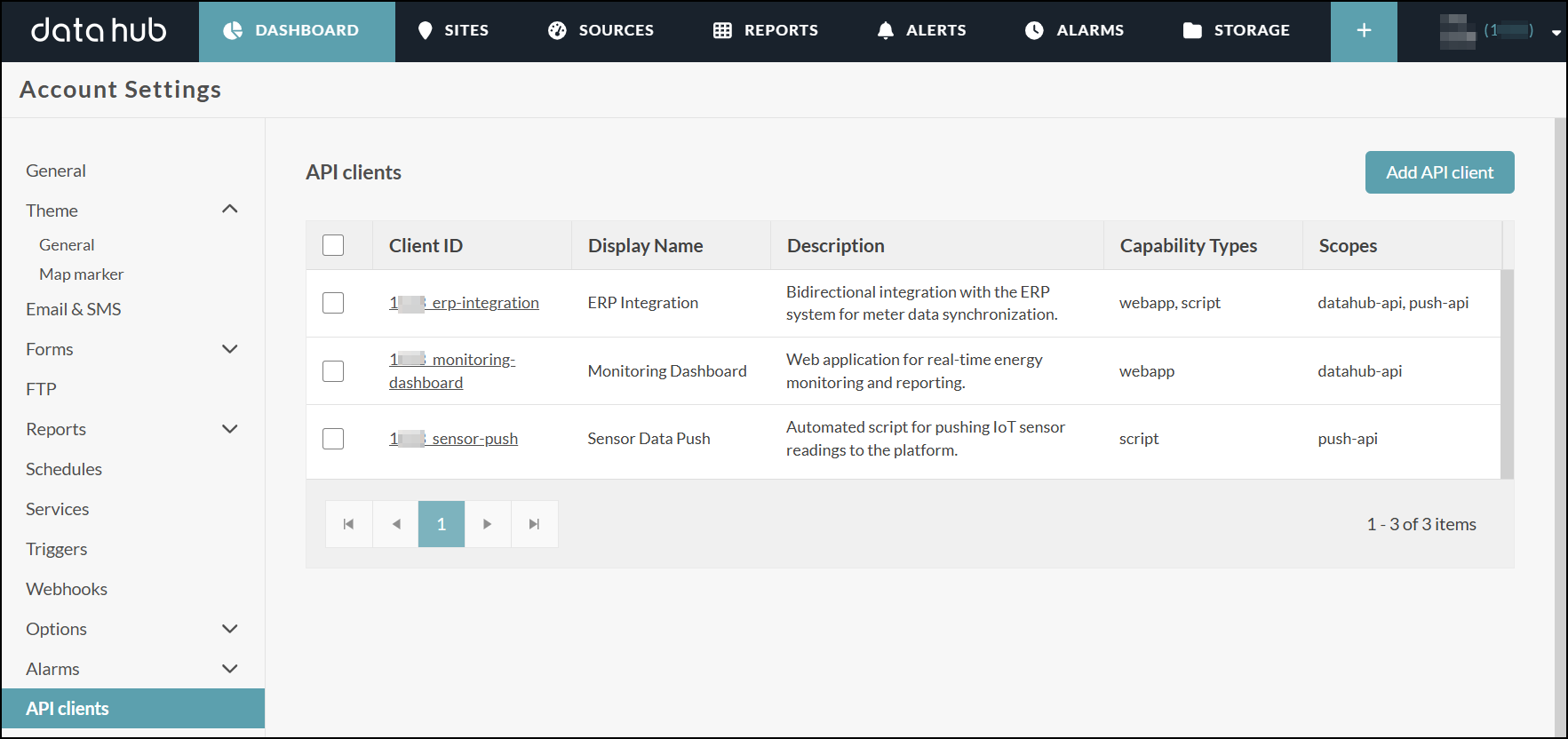
The list displays all API clients configured on your account. Each row shows:
| Column | Description |
|---|---|
| Client ID | Unique identifier of the client. Click to open the client's configuration. |
| Display Name | Human-readable label, if configured. |
| Description | Optional description of the client's purpose. |
| Capability Types | The capability types enabled for this client (WebApp, Script). |
| Scopes | The API scopes granted to this client. |
From the list, you can:
- Add a new API client using the Add API client button.
- Select one or more clients using the checkboxes to perform bulk actions (e.g. delete).
- Open a client's configuration by clicking its Client ID.
Create an API client
Click Add API client, fill in the configuration form, then save. The client secret is automatically generated on save.
Note
The number of API clients per account is limited. The default limit is 5 clients. Contact your administrator if you need to increase this limit.
Edit an API client
Click the Client ID in the list to open its configuration. All fields can be updated except the Client ID, which is read-only after creation.
Regenerate a client secret
Open the client configuration and click Regenerate in the Credential section. A new secret is generated immediately and the previous one becomes invalid.
Warning
Regenerating the secret will break any integration still using the old secret. Update your applications accordingly.
Delete an API client
Select one or more clients using the checkboxes and use the bulk action menu, or open an individual client and delete it from there. The client and its credentials are permanently removed.
Client configuration
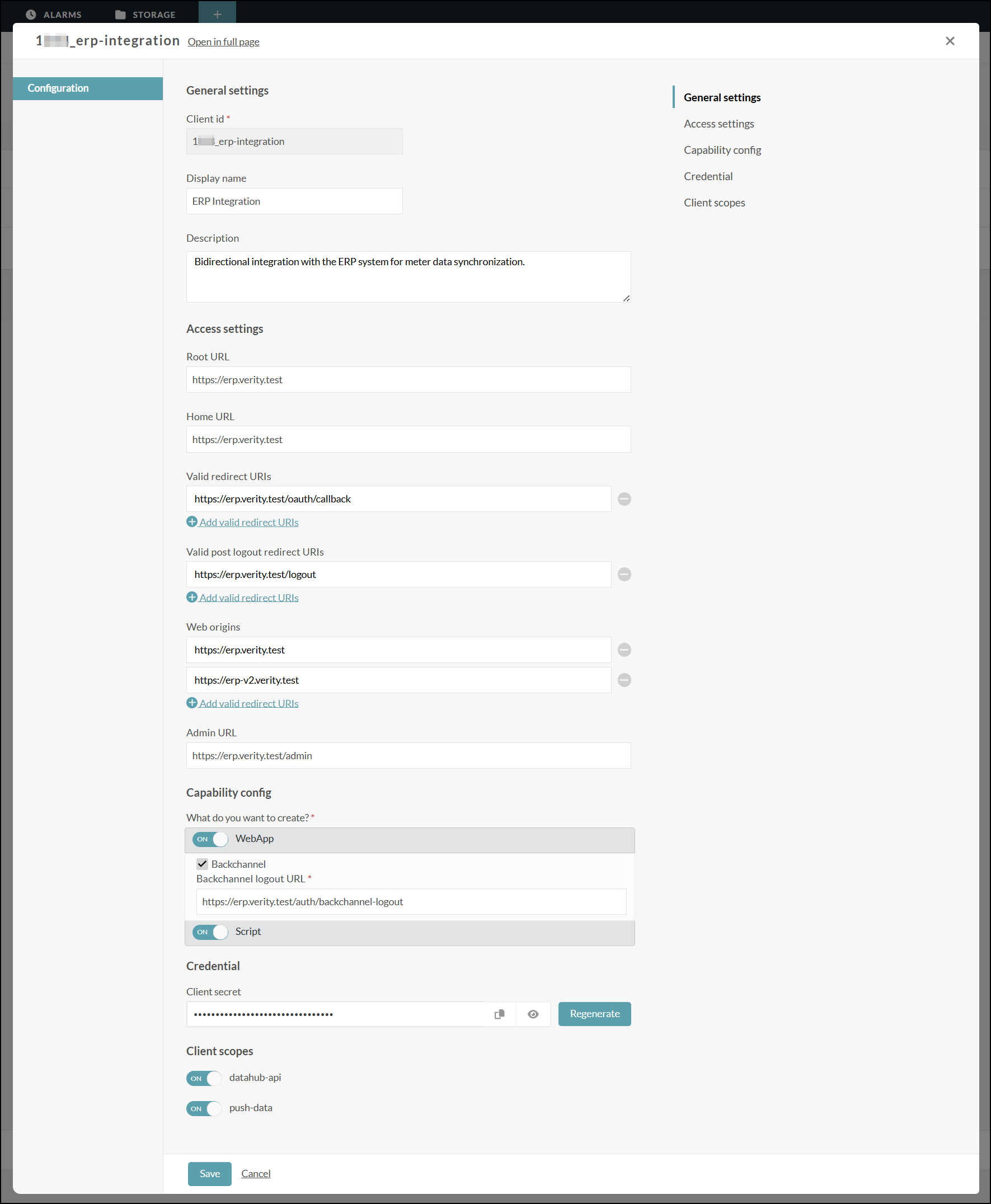
General settings
| Field | Required | Description |
|---|---|---|
| Client ID | Yes | Unique identifier for the client. Must be prefixed with {accountId}_. Cannot be changed after creation. |
| Display name | No | Human-readable label shown in the interface. If left blank, the Client ID is used instead. |
| Description | No | Free-text description of the client's purpose. |
Access settings
| Field | Required | Description |
|---|---|---|
| Root URL | No | Root URL appended to relative URLs used within this client. |
| Home URL | No | Default URL used when the server needs to redirect or link back to the client (maps to baseUrl in Keycloak). |
| Valid redirect URIs | No | Valid URI patterns a browser can redirect to after a successful login. Simple wildcards are supported (e.g. https://example.com/*). |
| Valid post logout redirect URIs | No | Valid URI patterns a browser can redirect to after a successful logout. Simple wildcards are supported. |
| Web origins | No | Allowed CORS origins. Simple wildcards are supported. Use + to allow all origins that match a valid redirect URI. |
| Admin URL | No | URL to the client's administration interface. Used by the server to push token revocation policies, and as a fallback for backchannel logout if no dedicated Backchannel logout URL is configured. |
Capability config
Select what type of client to create (at least one must be enabled):
- WebApp — enables the authorization code flow (standard OAuth 2.0 / OIDC flow), suitable for browser-based applications.
- Backchannel — when enabled, the server sends logout notifications directly to the application via a back-channel HTTP request (OIDC Back-Channel Logout). Requires a Backchannel logout URL.
- Script — enables the client credentials flow, suitable for server-to-server or machine-to-machine integrations that run without a user session.
Credential
The Client secret is generated automatically when the client is first saved. It is displayed in a masked field and can be:
- Copied to the clipboard using the copy button.
- Revealed temporarily using the show/hide button.
- Regenerated using the Regenerate button (not available when creating a new client).
Warning
Keep your client secret confidential. Never share it or commit it to source control. If compromised, regenerate it immediately from this page — the previous secret becomes invalid instantly.
Client scopes
Control which API scopes this client is allowed to request:
| Scope | Description |
|---|---|
| datahub-api | Required to query the Insights API. |
| push-data | Required to send datapoints to the platform. |