

Grouping sources
What this guide covers. How to link sources to each other in Verity — a sub-meter to its main meter, a dwelling to its grouping PRM, a site to a contractual portfolio — and how to compute on a parent source from the data of all its children, without listing them one by one. Read the Core Concepts section once, then jump to the step you need.
Who this is for. Account managers who model metering hierarchies, and anyone writing R for calculated variables who needs to aggregate, compare or allocate the data of a group of sources.
1. Why grouping exists
A source is usually a meter, and meters rarely live alone. A building has a main water meter and sub-meters per dwelling; a shared electricity supply has one upstream delivery point and several downstream points; a collective self-consumption operation has a producer and its participants. Until now, computing on such a group meant declaring every member as an input of a calculated variable — and editing that calculated variable every time the group changed.
Grouping changes that: you declare the link once, on the source, and calculated variables on the parent pick up its children automatically, over the periods during which they were attached.
Use it whenever a value depends on "all the sources that belong to X":
- Compare an upstream measurement with the sum of downstream measurements, and quantify the discrepancy
- Consolidate the consumption of every property of a site or a portfolio
- Track a group whose membership changes over time — a meter reassigned to another contract on a given date
2. Core concepts (read this once)
| Concept | What it is | Key property |
|---|---|---|
| Relationship | A form field of type Source, on a Source form. Its full name is Form.Group.Field — for instance Contractual.Parent.Source. |
One relationship = one way of grouping. Create as many as you need (contractual, physical, …). |
| Child | The source on which the relationship field is filled in. | The link is always edited on the child. |
| Parent | The source whose id is the value of the child's relationship field. | Sees its children in read-only. |
| Attachment | A time slice of the relationship field: an effective date and a parent. | Ends where the next slice starts. There is no end date to type. |
The golden rule
A child chooses its parent, never the other way round. You attach a source from its own Relations tab. The parent only shows who is attached to it.
Three behaviours that surprise people
- One parent per relationship at a time. A relationship field holds a single parent at any given date. A source can belong to several groups at once only through different relationships — one contractual parent and one physical parent, for example.
- An attachment has no end date of its own. It lasts until the next slice. To detach a source on a date, add a slice on that date with no parent.
- Groups can be nested. A parent can itself be the child of another source. Each calculated variable reads one level: the children of its own source.
3. Step 1 — Create a relationship
A relationship is a field of a Source form. You need write access to the forms.
- Go to Account Settings › Forms › Source and click Add form — or reuse an existing source form.
- Add a group, then add a field of Type Source. Name the form, group and field so that the full path reads well:
Contractual › Parent › Source,Physical › Main meter › Source, … - Turn on Make this field time sliced so that attachments can change over time. Recommended — without it, the source has one parent "since always", with no history.
The Source type is only offered on Source forms. Display list of values stays off: a Source field cannot be a list.
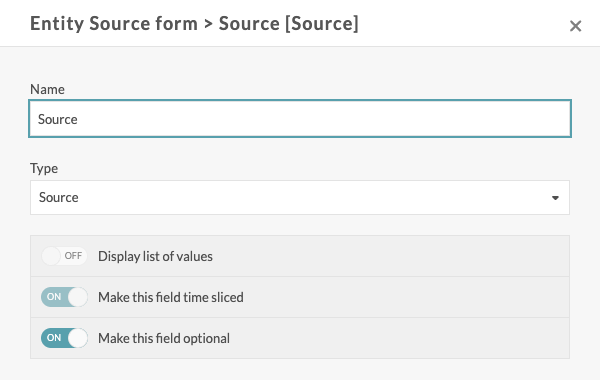
See Forms for the general form configuration.
4. Step 2 — Attach a child to a parent
In the user interface
Open the child source and go to the Relations tab. The tab appears as soon as the account has at least one Source field.
The Child of block shows one entry per relationship, titled Form › Group › Field, with the current parent as Site › Source. Click Show timesliced list to display the history, as a grid with the columns Period | Site | Source.
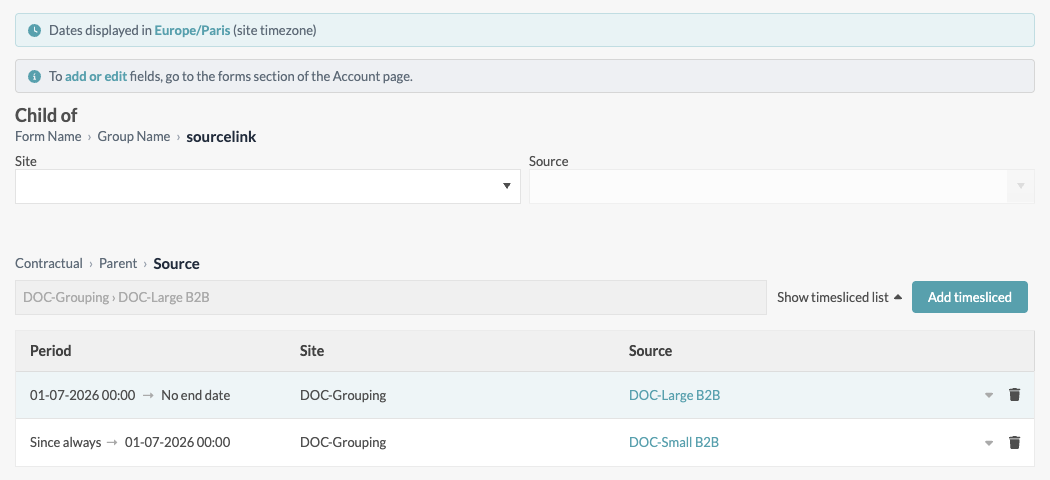
A relationship that is not time-sliced — sourcelink above — shows the Site and Source dropdowns directly, with no history.
To add an attachment:
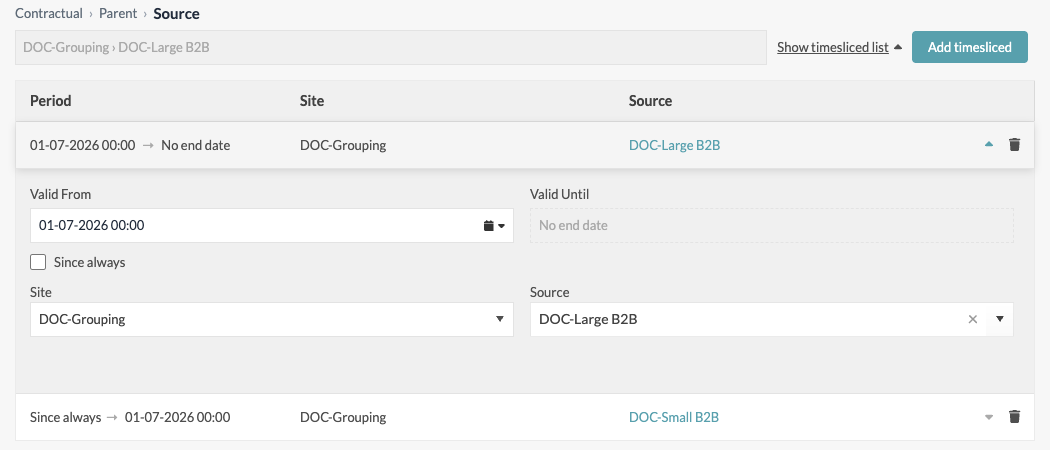
- Click Add timesliced.
- Set Valid From. A new row starts today at 00:00. Tick Since always if the source has always belonged to this parent.
- Choose the parent with the two cascading dropdowns: Site, then Source (type to filter). The source being edited is not proposed.
- Save the source.
Click the arrow of a row to edit it, or the bin to delete it. Valid Until is computed: it is the Valid From of the next row, or No end date for the most recent one.
| You want to… | Do this |
|---|---|
| Attach a source from the beginning | One row, Since always, parent selected |
| Reassign a source on 1 July | Add a row valid from 1 July with the new parent |
| Detach a source on 1 July | Add a row valid from 1 July and clear the Source (no parent) |
| Correct a wrong parent | Edit the parent of the existing row |
Dates are shown in the site timezone of the child — the banner at the top of the tab names it — and stored in UTC.
Two rows cannot share the same date: the duplicate is flagged Duplicate date and the source cannot be saved. Two Since always rows count as a duplicate. A relationship holds at most 100 time slices.
With the API
Attachments are part of the source's form data (clientData), and are written with PUT or PATCH /sources/{id}. Each slice is an EffectiveDate and a Value — the id of the parent:
PATCH /sources/2045

{
  "clientData": {
    "Contractual": {
      "Parent": {
        "Source": [
          { "EffectiveDate": null,                        "Value": 1201 },
          { "EffectiveDate": "2026-01-01T00:00:00+01:00", "Value": 1350 },
          { "EffectiveDate": "2026-07-01T00:00:00+02:00", "Value": null }
        ]
      }
    }
  }
}
Read as: attached to source 1201 since always, to source 1350 from 1 January 2026, detached from 1 July 2026.
EffectiveDate: nullmeans since always.Value: nullmeans no parent from that date.- The array is the complete list of slices: send them all.
- To append a single slice instead, use
POST /sources/{id}/attributes/{formName}/{groupName}/{fieldName}/sliceswith{"effectiveDate": "…", "value": 1350}. The date must not be earlier than the last existing slice. - Read the slices back with
GET /sources/{id}?includeTimeSlicedValues=true.
The request is rejected with an HTTP 400 when:
| Message | Cause |
|---|---|
| A source cannot be its own parent. | The parent id is the source itself. |
| Duplicate EffectiveDate in timesliced field … | Two slices share the same date, compared in UTC. |
| Invalid EffectiveDate format … | The date is not ISO 8601. |
| … is of type Source and expects an integer source id … | The value is not a source id. |
| Referenced source IDs […] do not exist or are not accessible. | The parent does not exist, or is outside your access rights. |
⚠️ Master Data import does not support Source fields in this release. Attach sources through the user interface or the API.
5. Step 3 — See the children of a parent
Open the parent source and go to the Relations tab. The Parent of block shows, for each relationship, the sources attached at the reference date — today by default. Change the Reference date to see the group as it was, or will be, on another day. Click a source name to open it.
The grid is read-only: to change an attachment, edit the child.
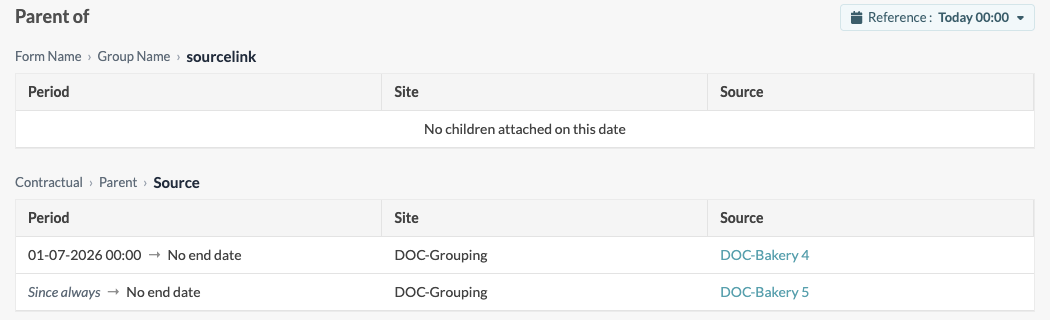
With the API, list the children of source 1201 on a date with:
GET /sources?propertyFilter.propertyName=Contractual.Parent.Source
            &propertyFilter.values=1201
            &propertyFilter.date=2026-11-03T00:00:00Z
            &includeTimeSlicedValues=true
Without propertyFilter.date, the current date is used. Each returned slice carries its EffectiveDate and EndDate.
6. Step 4 — Compute on a parent from its children
This is where grouping pays off: a calculated variable defined on the parent reads a variable of all its children, whatever their number, over their attachment periods.
6.1 Declare a children input
In the calculated variable of the parent, add a data source and set Variable selection to Children sources (instead of Current source). The Site and Source pickers disappear, and Variables becomes a tree:
- one node per relationship, labelled
Form › Group › Field; - under it, the variable names found on the children attached today.
Pick a variable name — for instance Consumption under Contractual › Parent › Source. Every child that has a variable with that name will be read.
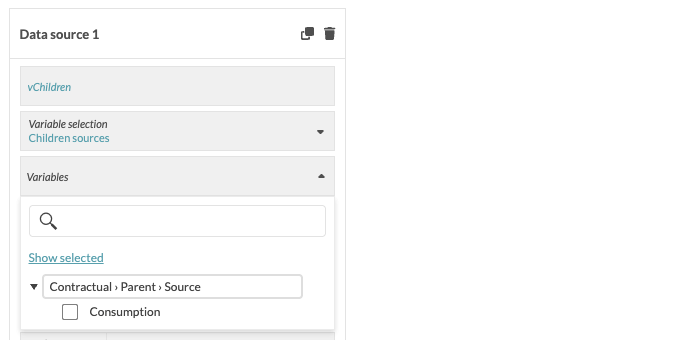
The rest of the card works as for any input and applies to every child: alias, datapoints tagging, granularity, aggregation, data window, unit, datapoints version. The alias — vChildren above — names the list in the R script.
💡 Set a granularity and an aggregation (for instance Hour / Sum) rather than Raw: the children's series then share the same timestamps, and summing them is straightforward.
6.2 What the R script receives
Children inputs arrive in a second object, inputChildrenVariables, next to the usual inputVariables. For an input aliased vChildren, it holds one element per child:
| Expression | Type | Content |
|---|---|---|
inputChildrenVariables$vChildren |
list | One element per child in scope. Empty list when none. |
…[[i]]$source_name |
character | Name of the child source |
…[[i]]$source_id |
integer | Id of the child source |
…[[i]]$attachment_periods |
data frame | EffectiveDates, EndDates — UNIX seconds, UTC, one row per attachment period within the evaluation range |
…[[i]]$variable |
list | Exactly the shape of an inputVariables entry: $Variable (metadata) and $TimeSeries (Dates, Values, Version, Tags) |
In other words, inputVariables$input1$TimeSeries$Values becomes inputChildrenVariables$vChildren[[i]]$variable$TimeSeries$Values.
What is in the list:
- Only the children attached during the evaluation range, and for each of them only the data points of its attachment periods. A meter reassigned on 1 July contributes to its first parent until 30 June and to its new parent from 1 July.
- Children are resolved again at every calculation: a newly attached source is included on the next run, with no change to the calculated variable.
- A child without a variable of the selected name is skipped silently.
- The order of the children is not guaranteed — identify them by
source_id, never by position.
inputChildrenVariables exists only when the calculated variable has at least one children input.
6.3 Copy-paste recipes
Sum a variable over all children:
{
  series <- lapply(inputChildrenVariables$vChildren,
                   function(child) child$variable$TimeSeries[, c("Dates", "Values")])
  all <- do.call(rbind, series)

  if (is.null(all) || nrow(all) == 0) {
    list(TimeSeries = data.frame(Dates = integer(0), Values = numeric(0)))
  } else {
    total <- aggregate(Values ~ Dates, data = all, FUN = sum)
    list(TimeSeries = data.frame(Dates = as.integer(total$Dates), Values = total$Values))
  }
}
Upstream minus downstream — the metering discrepancy. Two inputs on the parent: vMain, the parent's own meter (Current source), and vSubMeters, the children's consumption (Children sources), both with the same granularity and aggregation:
{
  up  <- inputVariables$vMain$TimeSeries[, c("Dates", "Values")]
  all <- do.call(rbind, lapply(inputChildrenVariables$vSubMeters,
                               function(child) child$variable$TimeSeries[, c("Dates", "Values")]))

  if (is.null(all) || nrow(all) == 0 || nrow(up) == 0) {
    list(TimeSeries = data.frame(Dates = integer(0), Values = numeric(0)))
  } else {
    down <- aggregate(Values ~ Dates, data = all, FUN = sum)
    m    <- merge(up, down, by = "Dates", suffixes = c(".up", ".down"))
    list(TimeSeries = data.frame(Dates = as.integer(m$Dates), Values = m$Values.up - m$Values.down))
  }
}
List who contributed — useful while building the script, in the verification tool:
sapply(inputChildrenVariables$vChildren, function(child) child$source_name)
See Calculated variables for the full input and output contract.
7. What triggers a recalculation
| Event | Recalculation |
|---|---|
| New data on the parent's own inputs marked As trigger | Yes, as for any calculated variable |
| New data on a child | No — see the warning below |
| A child is attached, detached, or its attachment date changes | Yes, automatically |
⚠️ Data arriving on a child does not trigger the parent's calculation. The As trigger switch of a children input has no effect in this release. Keep at least one Current source input marked as trigger on the parent, so that the calculation runs regularly and reads the children's latest data.
When an attachment changes, Verity recalculates from the earliest date affected by the change up to now, which covers both the old and the new periods. Two consequences:
- The recalculation concerns every calculated variable that uses this relationship, not only those of the parents involved.
- A Since always slice has no start date: changing it recalculates the whole history of those calculated variables. Plan bulk re-attachments accordingly.
8. Worked example — reassigning a meter between two groups
Two contracts group bakeries by size: Small B2B (< 40 MWh) and Large B2B (≥ 40 MWh). Each contract is a source, with a calculated variable Total consumption that sums its children.
- Relationship
Contractual › Parent › Source, time-sliced. - Bakeries Source 3 and Source 4 are children of Small B2B since always; Source 5 is a child of Large B2B.
- On 1 July 2026, Source 4 exceeds 40 MWh. On Source 4, add a slice valid from 1 July with parent Large B2B.
| Period | Small B2B total | Large B2B total |
|---|---|---|
| Until 30 June | Source 3 + Source 4 | Source 5 |
| From 1 July | Source 3 | Source 4 + Source 5 |
Saving Source 4 recalculates both totals from 1 July: neither calculated variable was edited.
A third level works the same way: a General Management source, parent of both contracts, sums their Total consumption.
9. Limits
| Limit | Value |
|---|---|
| Parents per relationship, at a given date | 1 |
| Time slices per relationship field | 100 |
| Children read per children input and per calculation | 500 by default (environment setting). Above it, the calculation fails — it is never truncated. |
| Master Data import of Source fields | Not supported in this release |
10. Troubleshooting
| Symptom | Cause | Fix |
|---|---|---|
| No Relations tab on the source | The account has no field of type Source. | Create one — see Step 1 above. If the tab is still missing, contact support. |
| Children sources is not offered in the calculated variable | Same cause. | Same fix. |
| A variable name is missing from the children tree | The tree lists the variables of the children attached today. | Check that at least one child currently attached has a variable with that name. |
| A child's data is missing from the result | The child has no variable with exactly that name, or was not attached during the evaluation range. | Align variable names across children; check the attachment dates in Parent of. |
| The parent does not recalculate when a child receives data | Children inputs do not trigger the calculation. | Mark a Current source input of the parent as trigger. |
| Calculation fails with an error naming the child limit | More children in scope than the limit. | Split the group across several relationships or parents, or contact support. |
| Calculation fails after a form change | The relationship (form, group or field) used by the input was renamed or deleted. | Select the relationship again in the input. |
| Duplicate date on save | Two slices share the same Valid From — or two Since always. | Change one of the dates, or delete the duplicate row. |
11. Cheat sheet
- A relationship is a Source field of a Source form, named
Form.Group.Field. Make it time-sliced. - Attach on the child, in Relations › Child of. The parent only displays Parent of.
- One parent per relationship at a time. Detach by adding a slice with no parent.
- In the parent's calculated variable, Variable selection = Children sources, then read
inputChildrenVariables$<alias>. - Each child brings
source_name,source_id,attachment_periodsandvariable— only the data of its attachment periods. - Child data does not trigger the parent; attachment changes do, from the earliest affected date up to now.