

Versioning
What this guide covers. Everything you need to version and tag measurement data in Verity, across all three ways data enters the platform: Standard Files, the Push API, and Calculated Variables. Read the Core Concepts section once — it applies everywhere. Then jump to the ingestion path you use.
Who this is for. Power users, integrators, and anyone writing R for calculated variables who needs output data points to carry a revision marker and/or free-form metadata.
1. Why versioning exists
By default, when new data lands on the same measurement, it overwrites the old value. Versioning changes that: the platform keeps multiple copies of the same measurement over time instead of throwing the previous one away. Each copy is a version.
Use it whenever your data is refined in stages:
- An intraday forecast updated several times a day
- A monthly correction or settlement cycle that supersedes an earlier estimate
- A batch you want to compare against a later batch
Every version is immutable. Once stored, it is never modified — new data always creates a new version alongside the existing ones. Nothing is lost as long as versioning is active.

2. Core concepts (read this once)
| Concept | What it is | Key property |
|---|---|---|
| VersionTimestamp | A timestamp the system generates automatically the moment a version is created. | The only true ordering axis. It records when the system knew or produced this value. "Latest" is always decided by this — never by your label. |
| VersionTag | An optional text label you supply (V1, forecast-run-3, correction-cycle-2). |
Purely informational. No ordering logic. Multiple versions can share the same tag. |
| BusinessTimestamp | The date/time the measurement applies to in your business (the date column). |
Independent of when the version was created. |
| Tags | One or more free-form labels attached to a data point. | The main way to filter and compare versions in dashboards and reports. |
The golden rule
versionis a label, not a number. The platform never sorts or ranks by your tag. Only the system-generated VersionTimestamp determines which version is the most recent.
Two behaviours that surprise people
- VersionTag is auto-copied into
tags. Whatever you put inversionis automatically mirrored into the data point's tags — so you can filter by version in dashboards as alternative option to timestamps, with zero extra config. - Re-pushing the same VersionTag replaces that tag's entry (for the same variable + timestamp).
3. How submission paths compare
You can send versioned data three ways. The concepts above are identical across all of them — only the syntax differs.
| Standard File | Push API | Calculated Variable | |
|---|---|---|---|
| Input | CSV / .xlsx upload |
JSON POST /api/data |
R script output |
| Version field | version column |
version (batch or reading level) |
Version column in returned data frame |
| Tags field | tags column (pipe \| separated) |
tags object (key/value) |
Tags column (JSON-object string per row) |
| Setup needed | IsVersioned flag on the variable |
IsVersioned flag on the variable |
IsVersioned flag on the variable |
| Best for | Manual or scheduled bulk loads | System-to-system integration | Derived values |
4. Path A — Standard File
A Standard File is a CSV or .xlsx you upload; the platform reads it and imports values into the right sources and variables.
File rules
- First line is the header row, then one data row per measurement.
- Column names are case-insensitive; unknown columns are ignored (so exports from other tools work as-is).
- Two columns always required:
date(ISO-8601yyyy-MM-ddTHH:mm:ss) andvalue(numeric, can be negative). - Plus at least one identifier:
variable_id, orsource_*+mapping_config, etc. Mix identifiers freely; rows sharing the same identifier combo are grouped.
Versioning columns (both optional)
| Column | Purpose |
|---|---|
version |
Supplies a VersionTag. Any string is valid — run id, cycle label, batch reference. |
tags |
One or more semantic labels, pipe-separated (e.g. quality:estimated\|period:high). |
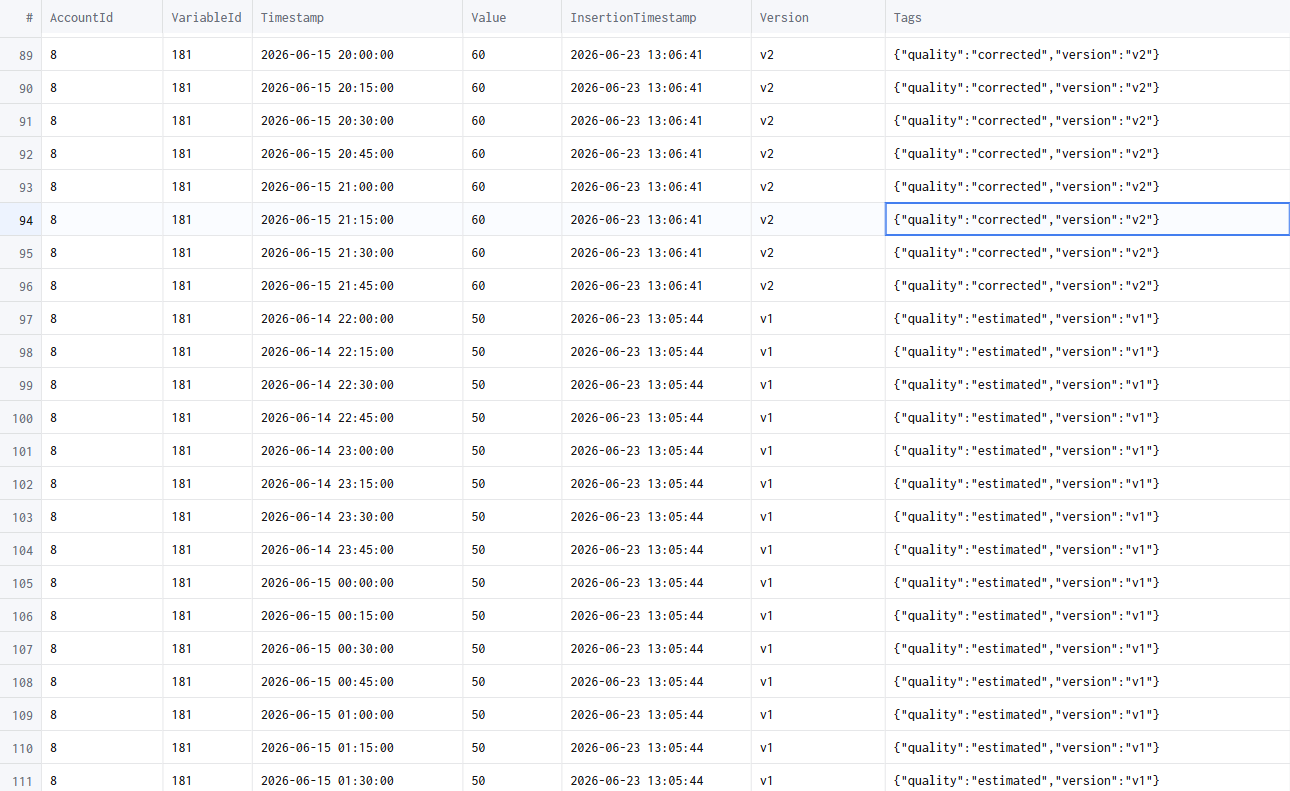
version is a reserved key. No mapping config needed — it's picked up directly at ingestion, version tags are created dynamically the first time they're seen, and the version is available for filtering immediately after ingestion completes.
Example
"date","value","variable_id","version","tags"
"2026-01-01T00:00:00","10","1","V1","quality:estimated|period:high"
"2026-01-01T00:00:00","10","1","V2","quality:consolidated|period:high"
Common mistakes
- Date format is strict —
01/01/2024will not be recognised. Useyyyy-MM-ddTHH:mm:ss. - One header row only — no sub-headers, units rows, or blank rows before data.
- Quoting is optional (
"10"and10both work); column order is free.
5. Path B — Push API
Send data straight from an external system: POST /api/data with a JSON payload. The platform authenticates, validates, and queues for ingestion.
Auth
- Bearer token:
Authorization: Bearer <token> - Or Basic (auto-exchanged for a token):
Authorization: Basic <base64(user:pass)> - Account needs the
datapusher.standardpermission. A401/403means contact your administrator.
Body shape
A JSON array. Each element describes one source/variable and carries an array of timestamped data readings. Identifiers work like the Standard File — supply whichever subset uniquely resolves your target (variableId, sourceSerialNumber + variableTypeId, mappingConfig, …).
Version & tags at two levels
- DataModel (batch) level — applies to every reading in that source/variable element. Use when the whole batch shares one version/metadata.
- Individual reading level — overrides or complements the batch values for one data point.
⚠️ Reading-level tags do not replace batch-level tags — the two levels are independent. Design your tagging strategy with that in mind.
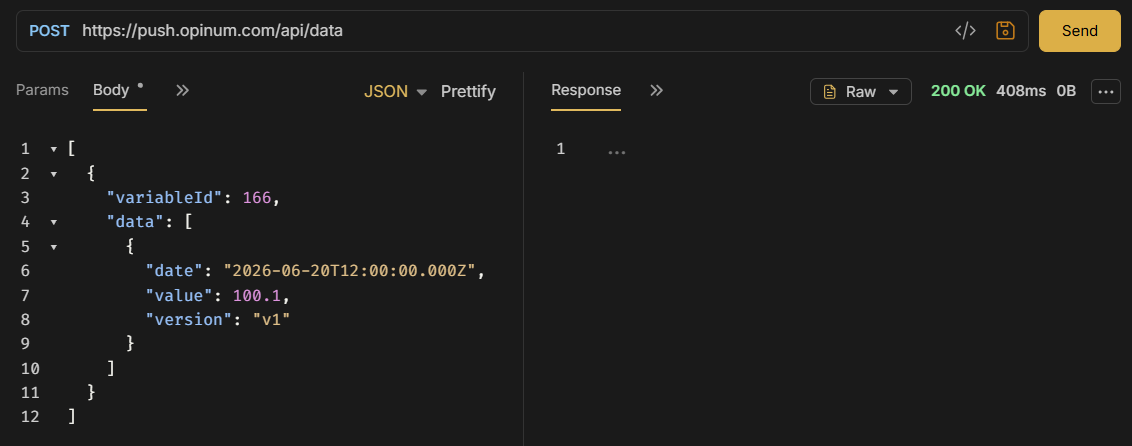
The version field behaves exactly as in the Standard File: client-supplied VersionTag, no prior config, created dynamically, auto-copied into tags. Tags here are free-form key/value pairs.
Example — batch level
POST /api/data?operationId=import-2026-05-27&operationTimeoutSec=600

[
  {
    "variableId": 123456,
    "version": "V1",
    "tags": { "site": "plant-a", "import": "nightly" },
    "data": [
      { "date": "2026-05-27T08:00:00Z", "value": 42.5 },
      { "date": "2026-05-27T09:00:00Z", "value": 43.1 }
    ]
  }
]
Example — reading level
[
  {
    "sourceSerialNumber": "MTR-0098",
    "variableTypeId": 7,
    "data": [
      { "date": "2026-05-27T08:00:00Z", "value": 1024.0, "version": "V1", "tags": { "quality": "measured" } },
      { "date": "2026-05-27T09:00:00Z", "value": 1031.5, "version": "V1", "tags": { "quality": "estimated", "reason": "sensor-gap" } }
    ]
  }
]
Keep in mind
- Never include
accountId,userId, orrolein the body — they're read from your token. - Dates should be ISO-8601 with timezone (
2026-05-27T08:00:00Z). Ambiguous local times may be misread. nullfields are ignored — send only what's relevant.
6. What happens when your data is processed
For each measurement (identified by variable + business timestamp):
| Situation | Result |
|---|---|
| VersionTag is new for this variable + timestamp | New version created, tag stored |
| VersionTag already exists for this variable + timestamp | New version created, replacing the previous entry for that tag |
| No VersionTag supplied | New version created; standard purging rules apply |
| Versioning disabled on the variable | Existing data overwritten — no history kept |
Whenever versioning is active, previous versions remain accessible. Versioning must be enabled on the variable for history to be preserved.
Retention & purging
- Default: max 7 versions per datapoint (per variable + timestamp). Configurable per variable or account — ask your administrator.
- At the limit, the shift strategy removes the oldest version to make room. Tagged versions are purged separately from untagged ones.
- Advanced purging profiles (intraday / daily / weekly / monthly retention) are planned for V2.
7. Viewing & comparing versions
Dashboards
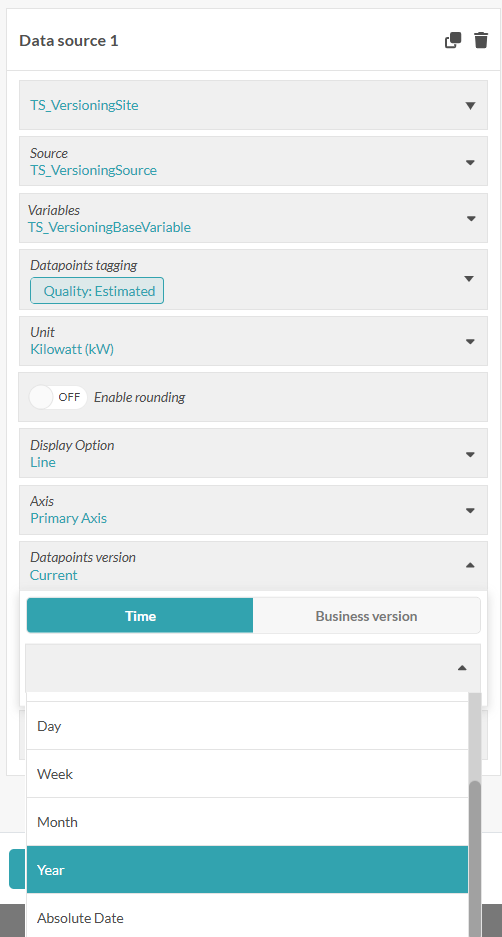
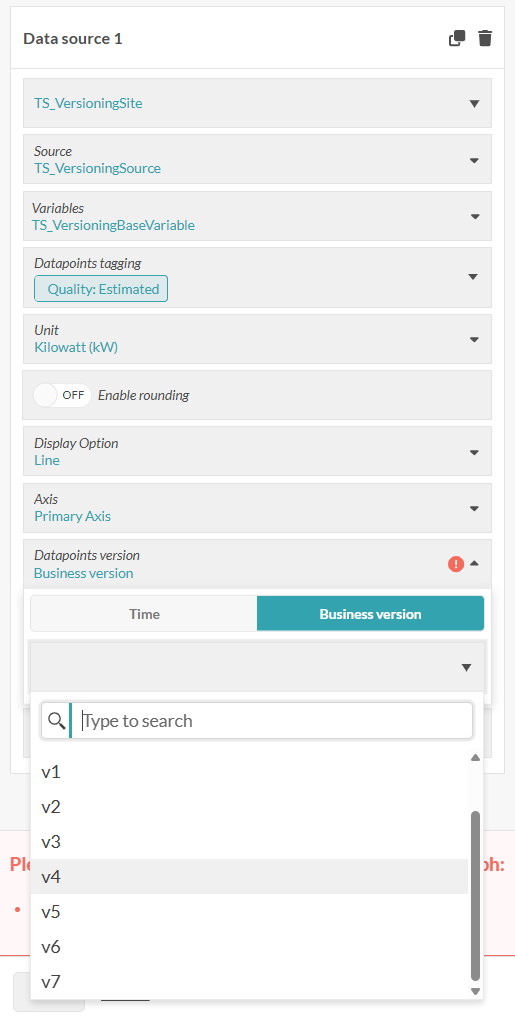
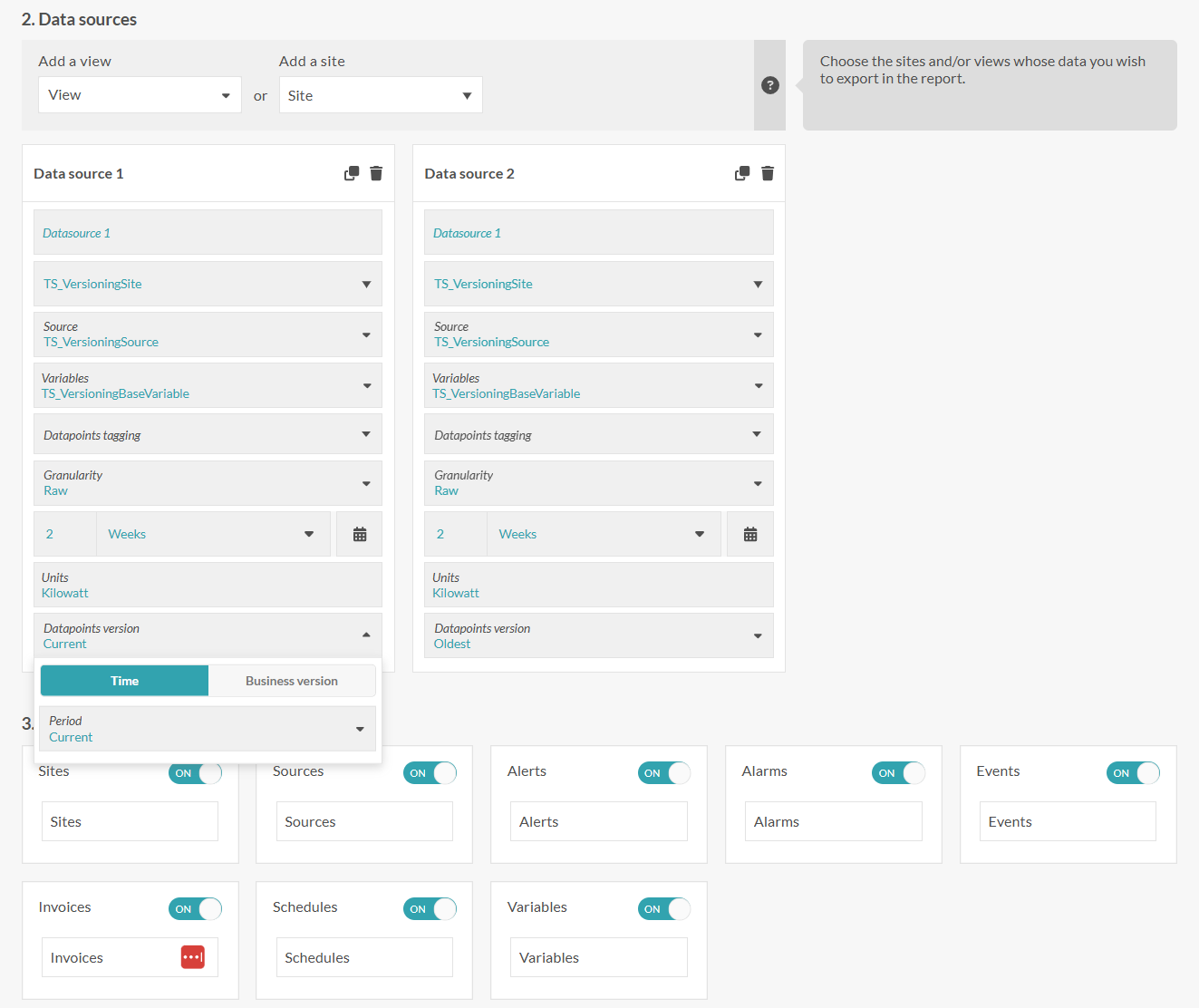
Filter by version in the data-source config. Two modes:
- Relative — picks a version dynamically: Current (latest at time t), or X last hours / days / weeks / months / years.
- Absolute — pick an exact moment with a date/time picker; returns the version that was most recent as of then.
With no filter set, the dashboard always shows the latest available version automatically — no manual refresh. You can display two versions side by side to see how data evolved between runs or correction cycles.
Reports
When configuring a report data source, select a specific version (by tag or by timestamp cutoff) to freeze the report to a precise state of your data.
8. Path C — Calculated Variables (deep dive)
Calculated variables (values derived from other variables) participate in versioning automatically. Each time an input gets a new version, the calculated variable recalculates and produces a new output version. By default the recalculation uses the latest available version of each input.
Every output is at minimum a (Date, Value) pair. This feature lets each data point also carry Version (a revision label) and Tags (free-form JSON metadata). Both fields flow both ways — you can read them on inputs and write them on outputs.
8.1 The one flag that changes everything: IsVersioned
IsVersioned is a setting on the variable, not something the R script controls. It decides how the storage layer treats two writes landing on the same Date:
IsVersioned |
Two writes at the same Date |
|---|---|
| off | Second write overwrites the first. Only one value per timestamp survives. |
| on | Two writes at the same Date with different Version values coexist as distinct revisions. Same Date + same Version still overwrites. |
So
Versiononly does its real job — keeping revisions apart — whenIsVersionedis on. With the flag off,Versionis a passive label.
8.2 The default Version the server fills in
When IsVersioned = true and your script supplies no Version for a row (no column, or ""), the server computes a default and applies it:
- Source: server wall-clock UTC at calculation time (
UtcNow). - Rounding: rounded up to the next whole hour (a time exactly on the hour stays as-is).
- Format: sortable ISO-8601 to the second,
yyyy-MM-ddTHH:mm:ss, no trailingZ. - Scope: one default per calculation run, applied to every row lacking an explicit Version.
| Server time when calculation runs | Default Version stored |
|---|---|
2026-05-19T15:00:00.000 (on the hour) |
2026-05-19T15:00:00 |
2026-05-19T15:00:00.001 |
2026-05-19T16:00:00 |
2026-05-19T15:30:42 |
2026-05-19T16:00:00 |
2026-05-19T15:59:59.999 |
2026-05-19T16:00:00 |
2026-12-31T23:30:00 |
2027-01-01T00:00:00 |
The practical consequence: because the default is rounded to the hour, every recalculation within the same clock hour produces the same default Version — so they overwrite each other. Once the clock ticks into the next hour, a recalculation gets a new Version and is stored as a new revision. Need finer control? Supply your own
Version— your non-empty value always wins.
8.3 Writing the R script
Your script receives each input as an R object:
inputVariables$input1$Variable              # named list of metadata
inputVariables$input1$TimeSeries$Dates      # integer vector, UNIX seconds, UTC
inputVariables$input1$TimeSeries$Values     # numeric vector
inputVariables$input1$TimeSeries$Version    # character vector, "" when none
inputVariables$input1$TimeSeries$Tags       # character vector of JSON strings
⚠️ Watch out for factors.
data.frame()may convert character columns into factors. Wrap text columns inas.character(...)whenever you read or pass them through, and setstringsAsFactors = FALSE.
Your script must return:
list(
  TimeSeries = data.frame(
    Dates   = <integer vector of UNIX seconds, UTC>,  # required
    Values  = <numeric vector>,                        # required
    Version = <character vector>,                      # optional
    Tags    = <character vector>,                      # optional, JSON
    stringsAsFactors = FALSE
  ),
  Errors = c()                                         # optional
)
Rules that matter:
DatesandValuesare mandatory; everything else optional.- If you include
VersionorTags, each must be the same length asDates/Values— a mismatch fails the whole calculation ("must be the same length as Dates/Values"). - A
Versioncell of""means "no version for this row" → server default applies (whenIsVersioned = true). - Each
Tagscell must be""or a valid JSON object with string values, e.g.'{"source":"manual","unit":"kWh"}'. Invalid JSON drops just that row's tags and logs a warning — it does not fail the calculation. - Don't need these fields? Omit the columns entirely.
8.4 Copy-paste recipes
All examples assume one input aliased input1.
Inherit the input's Version and Tags (1:1 transform):
list(
  TimeSeries = data.frame(
    Dates   = inputVariables$input1$TimeSeries$Dates,
    Values  = inputVariables$input1$TimeSeries$Values * 2,
    Version = as.character(inputVariables$input1$TimeSeries$Version),
    Tags    = as.character(inputVariables$input1$TimeSeries$Tags),
    stringsAsFactors = FALSE
  )
)
Set your own Version (same label every row):
n <- length(inputVariables$input1$TimeSeries$Dates)
list(
  TimeSeries = data.frame(
    Dates   = inputVariables$input1$TimeSeries$Dates,
    Values  = inputVariables$input1$TimeSeries$Values * 2,
    Version = rep("manual-2026-05-19", n),
    stringsAsFactors = FALSE
  )
)
Mix your own Version with the server default ("" rows fall back to the default):
dates  <- inputVariables$input1$TimeSeries$Dates
values <- inputVariables$input1$TimeSeries$Values * 2
ver    <- ifelse(values > 100, "qa-spike", "")   # "" -> server fills the default
list(
  TimeSeries = data.frame(
    Dates = dates, Values = values, Version = ver,
    stringsAsFactors = FALSE
  )
)
Attach Tags as JSON objects (auto_unbox = TRUE keeps scalars plain):
library(jsonlite)
n <- length(inputVariables$input1$TimeSeries$Dates)
tags <- vapply(seq_len(n), function(i) {
  toJSON(list(source = "qa-test", row = as.character(i)), auto_unbox = TRUE)
}, character(1))
list(
  TimeSeries = data.frame(
    Dates  = inputVariables$input1$TimeSeries$Dates,
    Values = inputVariables$input1$TimeSeries$Values,
    Tags   = tags,
    stringsAsFactors = FALSE
  )
)
# Resulting cells look like {"source":"qa-test","row":"3"}
8.5 Output version assignment summary
| Input VersionTag | Behaviour |
|---|---|
| None (no client tag) | Output version = ingestion hour rounded up. Multiple fires within the hour → same output version, only the last execution survives (earlier ones deduplicated). Different hours → distinct versions. |
V1 (re-pushed) |
Output for V1 is overwritten each time. |
V1 then V2 |
Two separate output versions coexist; each overwritten independently by re-pushing the same tag. |
The mapping of input tag → output version is fully configurable in the calculated variable's R code (inherit a specific input's tag, combine tags from multiple inputs, etc.).
9. Behaviour reference (calculated variables)
IsVersioned |
Script sets Version? | Script sets Tags? | What gets stored |
|---|---|---|---|
| false | no | no | No Version, no Tags. Re-running overwrites in place. |
| true | no | no | Every row gets the default hour-ceiling Version. Re-run within the hour overwrites; after the hour, a new revision. |
| true | yes (per row) | no | Your per-row Version is kept verbatim; server default not applied. |
| true | some rows, "" for others |
no | Non-empty rows keep their Version; "" rows get the server default. |
| true | no | yes | Default Version on every row + the parsed Tags. |
| true | yes | yes | Both fields stored exactly as supplied. |
Default-Version boundary cases: exactly on the hour (15:00:00.000) stays at that hour; 23:59:59.999 UTC rolls into the next day at 00:00:00.
10. Troubleshooting
| Symptom | Cause | Fix |
|---|---|---|
| Calculation fails: "must be the same length as Dates/Values" | Version/Tags vector length ≠ Dates/Values. |
Make every supplied column exactly length(Dates). |
| A row's Tags missing after a successful run | That row's Tags cell wasn't valid JSON; row kept, tags dropped, warning logged. | Emit valid JSON-object strings (jsonlite::toJSON(..., auto_unbox = TRUE)); check server warnings. |
| Recalculations keep overwriting instead of adding revisions | IsVersioned is off, or you're re-running inside the same clock hour (default Version unchanged). |
Turn on IsVersioned; wait for the next hour or supply your own distinct Version. |
| Text values come back as odd factor codes | data.frame() factor conversion. |
Wrap in as.character(...) and set stringsAsFactors = FALSE. |
Verifying a change end to end
- Configure the calculated variable with the
IsVersionedsetting you want. - Trigger a calculation (force-update event or the realtime path).
- Read output DPs back via the DataPoints gRPC service.
- Check
VersionandTagson each row against expectations. - For default-Version cases: cross the hour boundary, retrigger, and confirm a new revision was added rather than the previous one overwritten.
11. Cheat sheet
- Latest = newest VersionTimestamp, never your label.
- Standard File / Push API:
versionneeds no setup, is created dynamically, and is auto-copied intotags. - Calculated variables: revisions only coexist when
IsVersioned = on. - No script Version +
IsVersioned = on→ default = next-hour-ceiling timestamp → one revision per hour. - Your non-empty Version always wins over the server default.
- Default retention = 7 versions per datapoint (configurable).