

S505 - S521
Weekly aggregated load curves published for a balance responsible entity (RE), broken down by supplier and by sub-profil. S505 covers profiled consumers and producers; S521 covers remotely metered ones. Both are read.
How one file is split
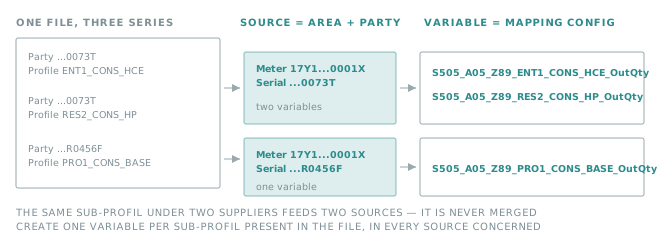
A single file carries many series, and two different parts of a series decide where its points end up: the perimeter selects the source, the sub-profil selects the variable.
Important
The sub-profil is part of the mapping config key. A variable configured without that segment receives nothing. Create one variable per sub-profil present in your files, in every source concerned.
Warning
These files are recognised from their name, which has to start with S505_ or S521_, in uppercase. A
renamed file is skipped.
Common to both flows:
| Series | One AccountTimeSeries per (perimeter, business type, sub-profil) |
| Process type | The ProcessType of the document: A05 or A08 |
| Timestamp | Start of the period TimeInterval, plus (Pos - 1) × Resolution, in UTC |
| Resolution | Read from Resolution, in the PT<minutes>M form — for example PT15M |
Note
A Resolution that is not written in the PT<minutes>M form stops the processing of the file with an error
rather than producing shifted points.
S505
Weekly aggregated curves of profiled consumption and production, per RE, supplier and sub-profil.
Insights configuration
| Property | Value |
|---|---|
| Meter number of the source | Area of the series |
| Serial number of the source | Party of the series |
| Mapping config of the variable | See below |
Mapping config
S505_{ProcessType}_{BusinessType}_{Profile}_{Qty}
| Segment | Description | Values |
|---|---|---|
{ProcessType} |
Type of process | A05, A08 |
{BusinessType} |
Type of aggregated curve | Z89: weekly aggregated consumption curves per RE, supplier and sub-profil Z90: weekly aggregated production curves per RE, supplier and sub-profil |
{Profile} |
Sub-profil of the series, written exactly as published | ENT1_CONS_HCE, RES2_CONS_HP, PRO1_CONS_BASE, … |
{Qty} |
Which quantity carries the value | OutQty for Z89 InQty for Z90 |
The last segment is not a free choice: it follows the business type, because consumption and production are not published on the same line.
Examples
S505_A05_Z89_ENT1_CONS_HCE_OutQty
S505_A05_Z89_RES2_CONS_HP_OutQty
S505_A05_Z90_PRO2_CONS_HP_InQty
Data point
| Value | OutQty of the interval for Z89, InQty for Z90 |
Note
A key showing two underscores in a row (Z89__OutQty) means a series arrived without any Profile, which the
flow is not supposed to publish. Report the file to support rather than creating a variable for that key.
S521
Weekly aggregated curves of remotely metered consumption and production, per RE, broken down by supplier and by voltage domain, supplier calendar or production type.
File name: <id_flux>_<code_EIC_emetteur>_<code_EIC_area>_<code_EIC_party>_<date_samedi_semaine>_<version>.xml
Insights configuration
| Property | Value |
|---|---|
| Meter number of the source | code_EIC_area, read from the file name |
| Serial number of the source | code_EIC_party, read from the file name |
| Mapping config of the variable | See below |
Important
Unlike S505, the perimeter of an S521 series is taken from the file name, not from the content of the series.
Mapping config
S521_{ProcessType}_{BusinessType}_{Profile}
| Segment | Description | Values |
|---|---|---|
{ProcessType} |
Type of process | A05, A08 |
{BusinessType} |
Type of aggregated curve, written exactly as published | Z92a: consumption, broken down by supplier and voltage domain Z92b: consumption, broken down by supplier and non-profilable supplier calendar Z93: production, broken down by production type |
{Profile} |
Sub-profil of the series, normalised — see below | BT_LE_36kVA_RES, BT_GT_36kVA, HTA, PV, EOL, HYD, NOPROFILE, … |
There is no Qty segment: S521 always stores the same difference, whichever the business type.
How a profile becomes a segment
S521 publishes sub-profils that contain characters a key cannot carry, such as BT<=36kVA RES. They are
normalised, always the same way.
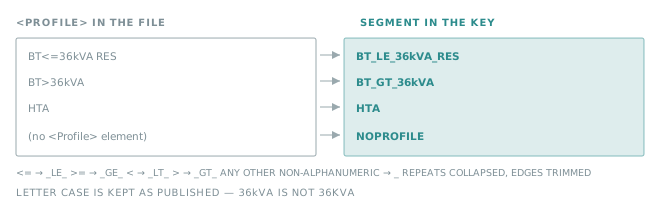
A series that carries no <Profile> element — which happens for several consumption series — uses the
NOPROFILE token, so that the key never ends on an empty segment.
Examples
S521_A05_Z92a_BT_LE_36kVA_RES
S521_A05_Z92a_BT_GT_36kVA
S521_A05_Z92a_HTA
S521_A05_Z92b_NOPROFILE
S521_A05_Z93_PV
Data point
| Value | OutQty minus InQty of the interval |
The sign therefore carries the direction: positive for consumption, negative for production. One variable is enough per series, whatever the business type.