

Verity Insights 8.0
Release date: xx - xx - 2026
Highlights
V8.0 introduces datapoint tagging and versioning and a new tenant cloning capability for SaaS environments, alongside a set of bug fixes across Alarms, Reports, Sources, Accounts/Organizations, and authentication.
✨ New Features
Datapoints Tagging & Versioning
Tag and version your datapoints, then filter and visualize by tag or version across the platform.
📖 See the See documentation for setup and usage.
Availability: Tagging and versioning are supported on ClickHouse-backed accounts only, and are available to SaaS clients only. On non-ClickHouse databases, the tag/version selectors are hidden automatically.
Tagging
- Tag ingestion, including dynamic version-tag creation
- Tag family and value management in the Tag Manager
- Unknown-tag feedback on the ingestion webhook
- Tag support in the GetData API
- Tag filtering in Dashboards, Source Visualize, Reports, and Alarms
- Tags usable in calculated variables
Versioning
- Creation and storage of datapoint versions
- Filtering and visualization by version in Dashboards and Reports
- Versioning support in calculated variables
- Version-level visualization on variables
- Versioning purging strategy
Tenant Cloning
Clone a tenant into another environment for testing and validation.
Operated by DevOps: Cloning is performed and maintained by the DevOps (SaaS) team as an operational action — it is not a self-service / end-user feature.
- Shared DB + client-specific DB provisioning infrastructure
- Connection routing library (per-account / per-tenant DB routing)
- Tenant- and user-remap scripts (prevents ID collisions on restore)
- Automated database export/restore, cleanup scripts, and step orchestration
- Organization ↔ tenant association (creation, update, and migration of existing tenants)
🔧 Improvements
Configurable value rounding per datasource
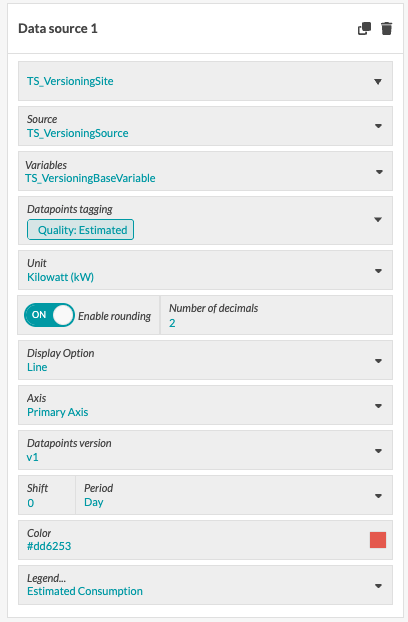
A new datasource-level configuration to define whether value rounding is enabled and the number of decimal places to round to. The goal is to improve chart readability while preserving raw data in CSV exports.
- Two new options in the datasource configuration screen: an Enable rounding switch (boolean, default
false) and a Number of decimals field (integer, default2, minimum0, shown only when rounding is enabled; negative values rejected). - Does not apply to: tile CSV downloads and raw backend data.
- This is a numeric rounding, not display formatting only (e.g.
1.456→1.46). - Automatic axis scale behavior remains unchanged: rounding to 2 decimals does not force the Y-axis to display 2 decimals.
- Two new options in the datasource configuration screen: an Enable rounding switch (boolean, default
Alarms: add a description when acknowledging an alarm
You can now add an optional comment when acknowledging an alarm. The acknowledgement confirmation dialog includes a new optional "Comment" field where you can record context — for example, "Checked on site, faulty meter replaced."
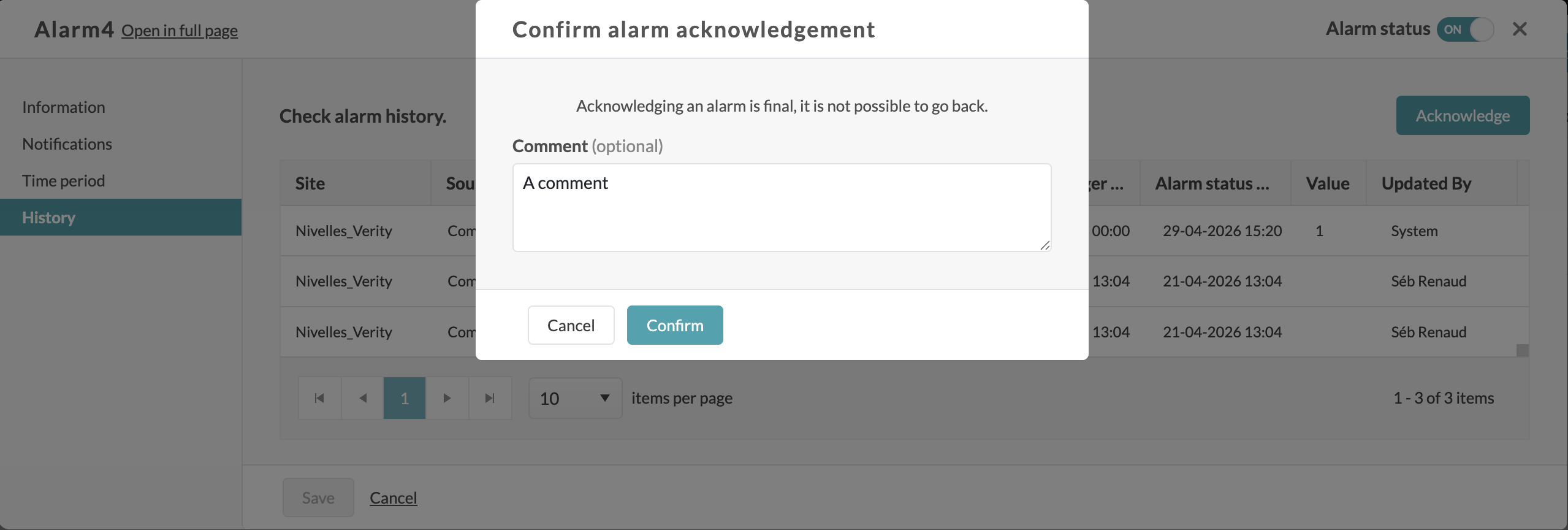
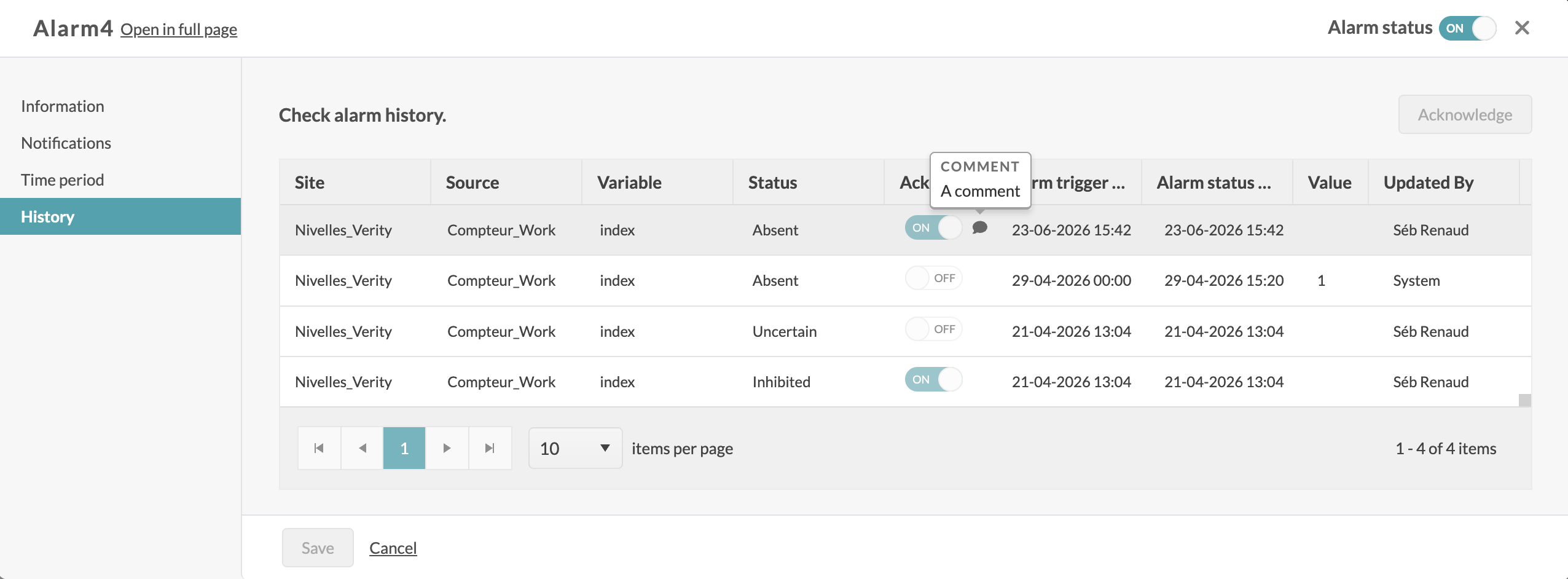
Once an alarm is acknowledged with a comment, a comment icon appears on the corresponding row in the alarms table. Hovering over the icon displays the comment in a tooltip. Rows acknowledged without a comment remain unchanged, with no icon shown.
- Scheduler: use the account timezone for configuration
Report and alarm execution times in the Scheduler are now displayed and configured in your organization's local timezone, so there's no more need to mentally convert from UTC. Administrators can set a timezone at the tenant level (IANA format, e.g. Europe/Brussels) from the tenant settings. Once configured, both the Raw and Advanced scheduler modes show all scheduled times — and the "Next occurrences" dates — in that timezone, with the label reflecting the actual zone (e.g. CET/CEST) instead of UTC. Times are still stored internally in UTC, so existing schedules are unaffected. If no timezone is set on the tenant, everything falls back to UTC exactly as before.
- Reports: warn when a datasource name exceeds 31 characters
- Sources service performance improvements
- Reorganized paid-feature handling in UI/API
- Customizable account menu
- Keycloak upgrade
- Metadata service migrated to VariableMetaData V2
🐛 Bug Fixes
Alarms
- COUNT-aggregation alarms no longer inherit the variable's unit
- Could not update a source view used by an alarm template
Sources & Reports
- Source view deletion failure
- Source displayed twice on the first pages of "Sources"
- Custom reports returned empty unit properties
usagesfield missing from source views- Impossible to delete a filter (source, site, …)
Accounts & Organizations (API validation)
PUT /accountswith empty timezone now defaults to UTC instead of erroring- Timezone now stored at the account root
Authentication (Keycloak / SSO)
- Resolved blank-page and login failures affecting some accounts
- Fixed SSO failures when accessing environments across realms
- Corrected wrong-password redirection, slow user creation, and impersonation sign-out
- Fixed authentication errors (HTTP 400/431) under certain production configurations
Other
- Calendar could not be created in English; end time at 24h rejected
- Footer localization ignored the default account language
- Schedule ticks correction
- ENTSO-E API now requires the time component in
periodStart/periodEnd - Station ID sync job fixes
⚠️ Notes
- Tagging & versioning require ClickHouse and are SaaS-only. Non-ClickHouse accounts will not see tag/version controls.
- Tenant cloning is a DevOps-operated action for test/validation environments, not a customer-facing function.