

Speed Physical
RTE documentation
The RTE documentation is available here.
What this API collects
Raw physical measurements for a delivery point, published close to real time and therefore not validated. The quality of each value is carried by its status, which is part of the key: the same curve is split across several variables depending on how each point was obtained.
Insights configuration
Source
Create one source per EIC, as described in Source configuration.
| Property | Value |
|---|---|
| Source type | Rte |
| Meter number | The EIC code |
Variables
| Property | Value |
|---|---|
| Name | Free text |
| Variable type | Basic |
| Mapping config | See Mapping config |
| Granularity | 5 minutes or 10 minutes, depending on the resolution of the data |
| Quantity type | Instant |
| Unit | Kilowatt (kW) |
Mapping config
SPEED-PHYSICAL_{product}_{status}_{resolution}_{unitName}
{product}
| Value | Meaning |
|---|---|
ACTIVE_POWER_IN |
Average active power injected |
ACTIVE_POWER_OUT |
Average active power withdrawn |
{status}
| Value | Meaning |
|---|---|
A02 |
Data was not available when the meter was read |
A04 |
Value recorded by the reference meter, with no adjustment or conventional replacement |
A05 |
Value computed from incomplete data |
Warning
These three statuses are the only ones collected. If RTE ever returns another status, those values are discarded and a message is written to the log — they are not merged into a neighbouring variable.
Tip
Configure A04 first: it is the sound measurement. Adding A02 and A05 alongside it turns the pair into a
quality indicator, showing when the raw feed is degraded.
{resolution}
| Value | Applies to |
|---|---|
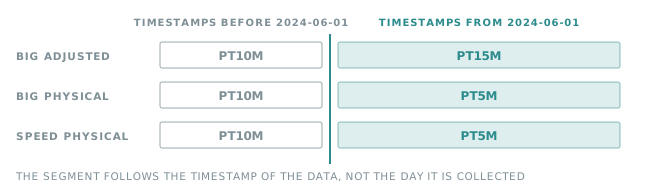
PT10M |
Data points timestamped before 2024-06-01T00:00:00Z |
PT5M |
Data points timestamped on or after 2024-06-01T00:00:00Z |
Important
The resolution follows the timestamp of the data, not the day it is collected. A recovery that reaches back across 2024-06-01 produces both resolutions in the same run, so both variables have to exist for the history to be complete.
{unitName}
| Value | Meaning |
|---|---|
KW |
Kilowatt |
Examples
SPEED-PHYSICAL_ACTIVE_POWER_IN_A04_PT5M_KW
SPEED-PHYSICAL_ACTIVE_POWER_OUT_A05_PT10M_KW
Collection schedule
Once a day, at 07:30 UTC.
Recovery behaviour
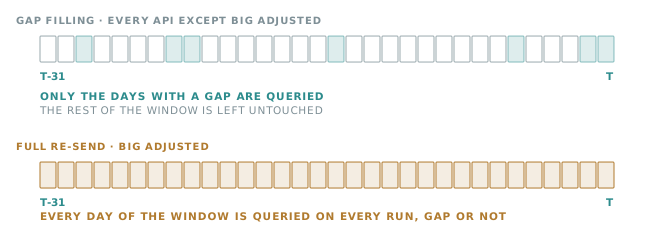
Gap filling over the last 31 days: a day is queried only when one of the SPEED-PHYSICAL_* variables has no
data for it. Days already covered are left untouched.
Note
Because the source data is raw, a value collected today may be superseded by a validated measurement later on. Use Big Physical when you need the validated version of the same curve.