

RTE France
Insights collects part of the data published by RTE, the French transmission system operator, through the APIs exposed on data.rte-france.com. This page describes what every RTE collection has in common: how a collection runs, how a data point finds its variable, and which conditions have to be met for an EIC to be queried at all.
Important
Start with Id Referential. It tells you which delivery points and which APIs are inside the perimeter you are allowed to query, and it is the fastest way to find out why an EIC returns nothing.
Available data
| API | What it carries |
|---|---|
| Id Referential | The perimeter itself: which points exist and which APIs they expose |
| Big Adjusted | Reconstituted consumption and production |
| Big Physical | Validated physical measurements |
| Speed Physical | Raw physical measurements, close to real time |
| Big Bre Reconstitution | Balance responsible entity reconstitution curves |
| Big Arenh | ARENH allocation curves, transmission and distribution networks |
| Big Imbalance | Balance responsible party imbalances and settlement amounts |
| PEB | Block exchange programmes |
How a collection works
Every API follows the same path. A collection is triggered, one call is made per delivery point and per day, and each series returned by RTE is turned into a mapping config key that is matched against the variables of the source.
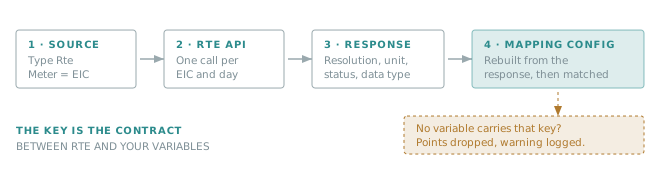
Nothing is created automatically: Insights only feeds variables that already exist and already carry the right key. This is what makes the key the central object of the whole configuration.
Source configuration
Create one source per EIC you want to collect.
Tip
EIC stands for Energy Identification Code, the unique identification scheme for market participants and
market objects (entities, zones, metering points, interconnections) defined by ENTSO-E.
Example format: 99XFR-XXXXXXXX-XX.
| Property | Value | What it is used for |
|---|---|---|
| Source type | Rte |
Required. The connector only looks at sources of this type. |
| Meter number | The EIC code | Required. This is what identifies the point at RTE. |
| Time zone | UTC |
Display only — data points are always pushed with UTC timestamps. |
| Energy type | Electricity | Reporting and unit consistency. |
| Usage type | General consumption | Reporting. |
| Name, description | Free text | Readability — a name containing the EIC pays off quickly. |
Important
An invalid or unknown EIC in Meter number is the most common cause of an empty collection. The EIC is matched against the referential before any data call is made.
The mapping config key
For every series it receives, Insights rebuilds a key from the response and looks for a variable of the source carrying exactly that key in its Mapping config property.
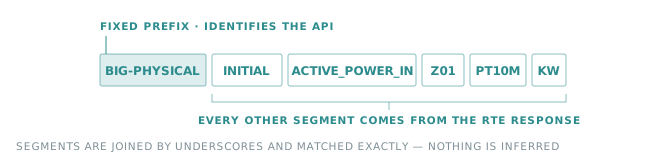
The first segment is a fixed prefix, one per API. All the following segments are read from the response — data type, status, resolution, unit — which is why the same API produces several keys for the same point.
Warning
The match is exact. A missing segment, an extra segment or a different resolution and the variable stays empty, without any error on the RTE side.
Tip
The log gives you the key to create, verbatim: There is no variable with MappingConfig = '…' in source with MeterNumber = '…'. Copying that value into the Mapping config of a new variable is the quickest way to complete a configuration.
Perimeter check
Four APIs verify the delivery point against the referential before calling RTE, and skip the point when it is outside the perimeter. The others call RTE directly and rely on RTE to return an empty response.
| API | Perimeter checked before the call | Api label looked up |
|---|---|---|
| Big Adjusted | Yes | Big Adjusted |
| Big Physical | Yes | Big Physical |
| Speed Physical | Yes | Speed Physical |
| Big Arenh | Yes | Big Arenh |
| Big Bre Reconstitution | No | — |
| Big Imbalance | No | — |
| PEB | No | — |
The conditions that make a point eligible are described in Id Referential.
Recovery window
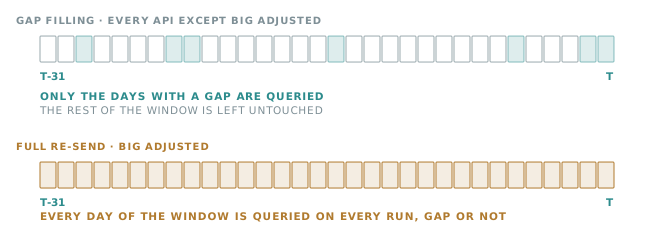
Every scheduled collection looks back over the last 31 days, not only over the previous day. Most APIs use that window to fill gaps: a day is queried only when one of the variables has no data for it. Big Adjusted is the exception and re-queries the whole window on every run.
Note
A variable created today therefore backfills on its own over the following runs, up to 31 days of history. Beyond that, ask for a manual recovery.
Collection schedule
Two rhythms are used, in UTC:
- Six times a day, at 00:30, 07:30, 08:15, 14:30, 16:00 and 17:00 — Big Adjusted, Big Physical and PEB.
- Once a day at 07:30 — Speed Physical, Big Arenh, Big Bre Reconstitution and Big Imbalance.
Big Adjusted and Big Physical use the extra runs to pick up the corrections RTE publishes during the day. They are the only two APIs that separate initial values from corrected ones, and their pages describe which runs do what.
Note
All the times in this section of the documentation are UTC and never shift with daylight saving time.